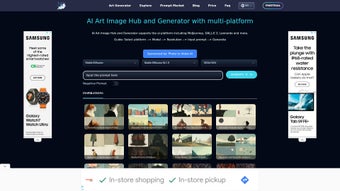

Download ArtiverseHub – AI Text‑to‑Image Generator, Free & Secure
Overview & Key Features
ArtiverseHub is a web‑based AI image generator that transforms natural‑language prompts into high‑resolution visuals in seconds. Built on a hybrid engine that combines OpenAI’s DALL·E, Stability AI’s Stable Diffusion, and several proprietary fine‑tuned models, the platform offers creators—designers, marketers, writers, educators—a fast, secure, and intuitive way to bring ideas to life without installing heavyweight software. The service runs entirely in the browser, so you only need a modern Chrome, Firefox, Edge, or Safari instance and an internet connection.
Rendering happens on encrypted cloud servers, keeping your device light and your data private. Whether you need a photorealistic product mock‑up, a stylized illustration for a blog post, or a quick concept sketch for a pitch, ArtiverseHub delivers consistent quality across a wide range of artistic styles. Its real‑time preview shows a low‑resolution thumbnail within moments, and a single click upgrades the selected result to full resolution.
The free tier provides unlimited low‑resolution renders, while premium plans unlock high‑resolution downloads, priority processing, and extended API usage. Below is a curated list of the most impactful capabilities that set ArtiverseHub apart from competing tools.
- Multi‑Model Engine: Switch seamlessly between DALL·E, Stable Diffusion, and custom fine‑tuned models to match the exact aesthetic you need.
- Prompt‑Based Generation: Write natural‑language descriptions; the AI interprets composition, lighting, perspective, and style.
- Instant Low‑Res Preview: See a thumbnail in seconds, then upscale with one click for a polished final image.
- Style Controls: Sliders for saturation, contrast, depth‑of‑field, plus artistic filters such as watercolor, oil‑paint, cyber‑punk, and more.
- Batch Generation: Submit up to 20 prompts in a single session, ideal for brainstorming or rapid asset creation.
- Secure Cloud Processing: All data is encrypted in transit (TLS 1.3) and at rest; your prompts and results stay private.
- Multiple Export Formats: Download PNG (lossless), JPEG (compressed), or SVG (vector) with optional metadata for copyright tracking.
- Collaboration Hub: Generate shareable links that let teammates comment, rate, or request variations without exposing your account credentials.
- RESTful API: Developers can embed the generation engine into their own applications, automating workflows or building custom design tools.
- Free Tier & Affordable Plans: Unlimited low‑resolution renders for free; paid subscriptions unlock high‑resolution output, priority queues, and higher API limits.
Installation, Setup & Everyday Use
Because ArtiverseHub is cloud‑first, there is no traditional installation. Getting started takes under five minutes and only requires a supported browser and an internet connection. Follow these steps to start creating:
- Create an Account: Visit artiversehub.com, click “Sign Up,” and register with an email address, Google, or Apple ID. The free tier activates immediately, giving you unlimited low‑resolution renders.
- Verify Your Email: A verification link is sent to your inbox; confirming it unlocks project saving, collaboration, and premium‑plan upgrades.
- Select a Model: After logging in, use the “Model Selector” dropdown. The default balanced DALL·E variant works for most cases, but you can switch to Stable Diffusion for more artistic freedom or a domain‑specific custom model for architecture, fashion, or gaming.
- Craft Your Prompt: Write a concise, descriptive sentence. Include subject, environment, lighting, and style for best results. Example: “A futuristic city skyline at sunset, ultra‑realistic, glass towers reflecting orange light.”
- Adjust Settings (Optional): Use sliders to set resolution, aspect ratio, and style effects. Enable “seed randomization” for varied outputs on identical prompts.
- Generate & Review: Click “Render.” Within seconds a low‑resolution thumbnail appears. If it meets your expectations, press “Upscale” for a high‑resolution version; otherwise tweak the prompt or sliders and try again.
- Save & Export: Click “Download,” choose PNG, JPEG, or SVG, and the file saves to your device while also being stored in your cloud library for later retrieval.
- Collaborate: Hit the “Share” button to create a secure link. Invite teammates to view, comment, or request variations without granting full account access.
- API Integration (Advanced): Navigate to the “API Dashboard,” generate an API key, and follow the documentation to call the generation endpoint from your own scripts or applications.
ArtiverseHub’s interface is fully responsive, so you can create and edit images on tablets or smartphones. All preferences and projects sync to the cloud, allowing you to switch devices without losing progress. Updates to models and UI are deployed automatically, ensuring you always have the latest features without manual downloads.
Compatibility
The platform runs in any modern browser supporting HTML5, WebGL, and TLS 1.3, making it compatible with Windows 10/11, macOS Ventura and later, popular Linux distributions, Android 8.0+, and iOS 13+. No native client is required, so even low‑spec devices can generate high‑quality images as long as they have an internet connection.
Pros, Cons & Frequently Asked Questions
Pros
- Instant, no‑download access works on any device.
- Multi‑model support offers flexibility for diverse visual styles.
- Fast rendering with real‑time low‑res previews.
- End‑to‑end encryption protects prompts and generated artwork.
- Generous free tier suitable for hobbyists, students, and quick experiments.
- Wide export options (PNG, JPEG, SVG) and metadata embedding.
- Collaboration tools streamline feedback loops.
- Comprehensive RESTful API enables automation and custom integrations.
- Regular model and UI updates improve quality over time.
- Responsive design works equally well on desktop and mobile.
Cons
- High‑resolution downloads require a paid subscription.
- Dependence on a stable internet connection; performance may suffer on slow networks.
- Complex prompts can sometimes produce unexpected artistic interpretations.
- Batch generation queues may experience delays during peak usage.
- No offline mode; the service cannot run locally without internet.
FAQ
Is ArtiverseHub really free to use?
Yes. The free tier provides unlimited low‑resolution renders and access to most core features. High‑resolution downloads, priority queues, and extended API usage are reserved for paid plans.
Which AI models are available?
ArtiverseHub integrates DALL·E, Stable Diffusion, and several custom fine‑tuned models. Users can switch engines via the Model Selector to match their desired style or realism level.
Do I need a powerful GPU?
No. All heavy computation is performed on ArtiverseHub’s cloud servers. Your local device only runs the web UI, so even older laptops or mobile phones can generate images.
How secure is my data?
Data is transmitted over HTTPS with TLS 1.3 and stored in encrypted cloud storage. Access is gated by authenticated accounts, and the service complies with GDPR and CCPA privacy standards.
Can I integrate ArtiverseHub into my own software?
Absolutely. The platform offers a RESTful API with detailed documentation. After generating an API key, you can send prompts programmatically and receive generated images, enabling automation, custom design tools, or educational platforms.
Conclusion & Call to Action
ArtiverseHub combines speed, flexibility, and security in a single cloud‑first AI image generator. Its multi‑model architecture, real‑time preview, and cross‑device compatibility make it a strong choice for creators of all skill levels. While premium plans are required for high‑resolution assets, the generous free tier offers enough power for everyday experimentation and light‑weight projects. If you’re seeking a reliable, easy‑to‑use tool that turns text into stunning visuals without demanding a powerful GPU, ArtiverseHub is ready to become a cornerstone of your creative workflow.
Download ArtiverseHub today, start generating, and watch your ideas come to life in seconds. Sign up for free now and unlock the future of visual creation.
Overall Rating: 4.5/5 – ArtiverseHub excels at turning textual ideas into polished visuals with speed and flexibility. The free tier is generous, and premium options provide the resolution and priority needed by professionals. While reliance on an internet connection is a minor drawback, the platform’s cross‑device compatibility and robust feature set make it a top contender in the AI‑image generation space.



.png)



